

Project Overview
How do you help users understand two AI products through video without relying on ordinary screen recordings?
That was the challenge behind our collaboration with AI Toolbox and Landy AI, two products owned by the same founder.
Splay Studio produced more than 60 how-to videos in just one month, creating a library of tutorials designed to help users understand product features and learn how to use them.
Rather than simply recording the interface and adding a voiceover, we built a custom production workflow combining feature-focused scripts, storyboard planning, vector-based UI assets, and creative animation.
The founder provided feedback throughout the process while our team handled the production execution, allowing the project to move forward without requiring their involvement in every stage.
The Challenge: Making Product Education Scalable
AI products offer many features, workflows, and ways to accomplish tasks. Explaining these capabilities clearly requires more than showing users where to click.
With two products to cover and more than 60 tutorials to produce, we needed a workflow that could balance three priorities:
- Clarity: Make each feature easy to understand through focused, step-by-step explanations.
- Creative presentation: Move beyond basic screen recordings and create polished, engaging product demonstrations.
- Production efficiency: Maintain a consistent standard across a large library while keeping the founder's day-to-day involvement minimal.
Our goal was to create more than a collection of individual videos. We wanted to establish a repeatable approach to product education that could handle a high volume of content within a tight deadline.
Our Approach: From Product Features to Animated Tutorials
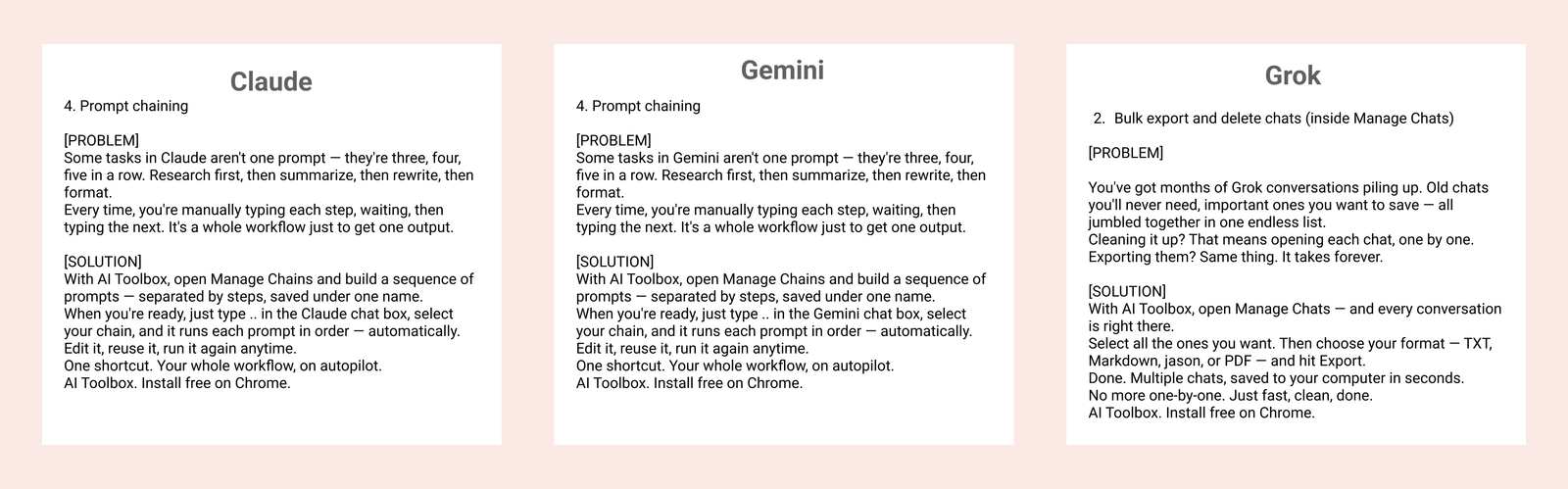
01. Writing Scripts Around Real Product Workflows
Every tutorial started with understanding what the feature did and what the viewer needed to learn.
We developed scripts around specific product capabilities, structuring each video to introduce the user's problem, explain the solution, and guide them through the relevant workflow.
For AI Toolbox, this meant explaining how features worked across different AI platforms, including Claude, Gemini, and Grok. While the underlying feature could be similar, the script needed to reflect the relevant platform and interface.
This approach helped keep each tutorial focused on a practical use case rather than turning it into a generic product overview.
02. Storyboarding the User Journey
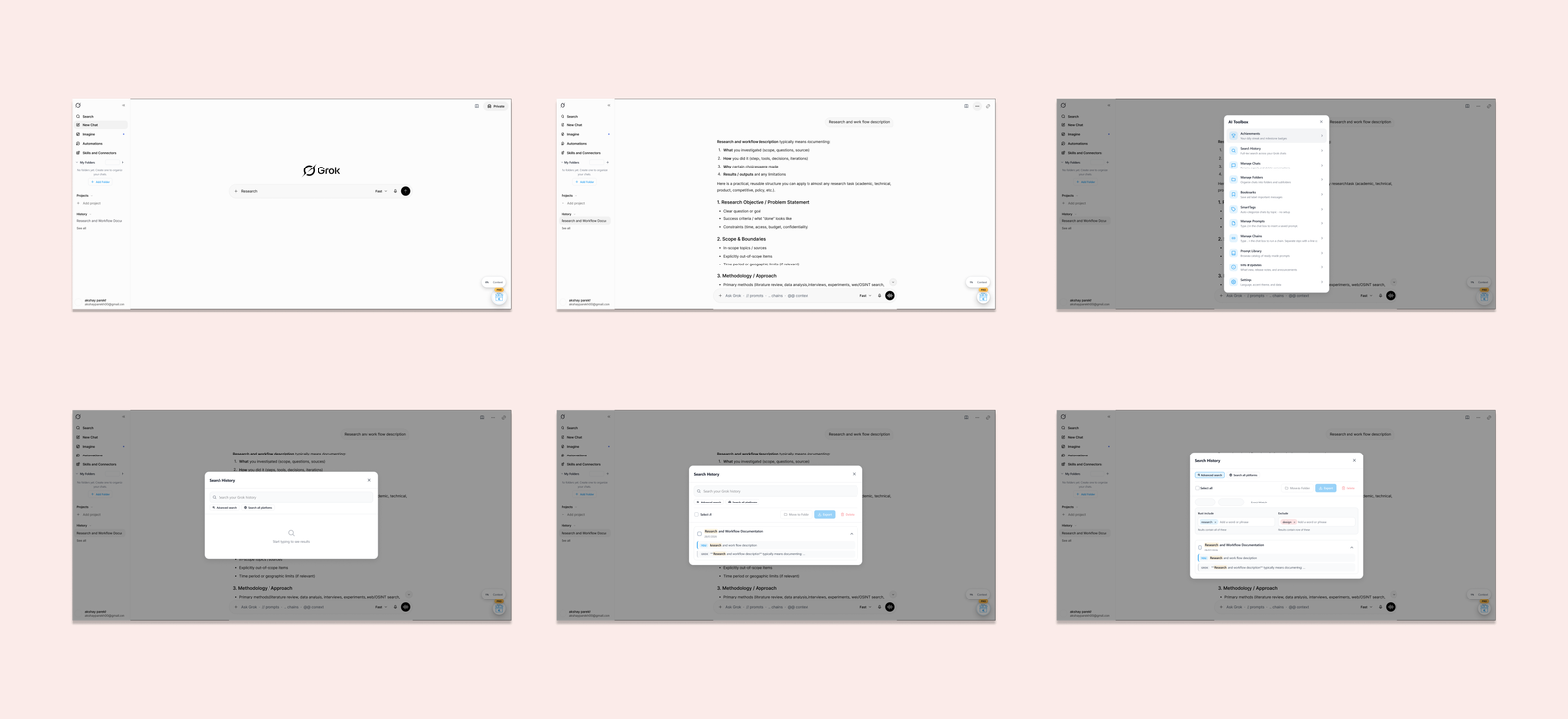
Once the script was established, we planned how the explanation would unfold visually.
The storyboard mapped the sequence of interface states and interactions needed to demonstrate the feature. This gave us a clear visual plan before moving into animation.
For example, a tutorial could begin with the AI platform's interface, introduce the AI Toolbox extension, and then move through the relevant feature screens in a logical sequence.
Planning these moments in advance helped us decide what the viewer should focus on at each stage, how the interface should transition, and where animation could make an action easier to understand.
03. Preparing Product Interfaces as SVG Assets in Figma
Instead of depending entirely on continuous screen recordings, we prepared interface visuals for custom animation.
We extracted relevant product screens and interface elements as SVG assets and organized them in Figma. Working with vector assets gave us greater flexibility over individual UI components and how they appeared in the final video.
Rather than treating the interface as one flat recording, we could work with separate visual elements and prepare them for controlled movement, transitions, and emphasis.
This became an important part of our production approach: the actual product interface remained central to the tutorial, but its presentation was designed specifically for the story being told.
04. Animating the Interface, Not Just Recording It
With the visual assets prepared, we used motion design to bring the product workflows to life.
Instead of showing every interaction through a continuous screen recording, we could control the timing of each step, guide attention toward important interface elements, and use movement and transitions to connect one action to the next.
The animation served a purpose: helping users follow the workflow and understand what was happening on screen.
This gave us the flexibility to present product features with more visual clarity and consistency while keeping the demonstrations grounded in the real interface.
Custom UI animation gave us greater control over pacing, focus, and transitions than a conventional screen recording.
05. Building a Repeatable Production Workflow
Producing more than 60 videos across two products in one month required a structured process.
We followed a consistent workflow from product understanding and scriptwriting to storyboarding, asset preparation, animation, review, and delivery.
Each stage established the foundation for the next, reducing unnecessary back-and-forth and helping us maintain a consistent approach across the video library.
The goal was not to make every video identical. It was to create a repeatable production system that could accommodate different features while maintaining the same level of care in storytelling and presentation.
06. Keeping the Founder Involved Without Managing Every Step
The founder's role was to provide feedback and guide the output, while Splay Studio handled the production execution.
This allowed the project to progress without requiring the founder to participate in every script, visual decision, or animation task.
By taking ownership of the workflow and incorporating feedback at review stages, we kept the collaboration focused and the production moving toward the deadline.
For a founder managing two AI products, this meant having a dedicated creative partner responsible for turning product functionality into a substantial library of tutorial content.
The Final Videos
The finished videos brought together product-focused scripts, planned visual sequences, and custom UI animation to explain features across AI Toolbox and Landy AI.
Rather than presenting the entire interface as a static screen recording, the tutorials used controlled visual storytelling to guide viewers through individual workflows.
- Video 1 — AI Toolbox: Demonstrating the custom interface animation and platform-level UI transitions.
- Video 2 — AI Toolbox: Highlighting diverse feature capabilities across multiple AI platforms (Claude, Gemini, Grok).
- Video 3 — Landy AI: Presenting end-to-end workflows demonstrating the breadth of the multi-product engagement.
The Outcome
60+ videos. 2 AI products. 1 month.
Splay Studio delivered more than 60 how-to videos for AI Toolbox and Landy AI within one month.
The project combined structured scripting, storyboard planning, vector-based interface preparation, and custom motion design in a repeatable production workflow.
The outcome was a substantial library of product education content, produced with feedback from the founder rather than requiring their day-to-day management of the process.
Beyond the number of videos delivered, the project demonstrates how a structured creative workflow can help technology companies scale product education without sacrificing thoughtful visual presentation.
Need to Scale Your Product Video Library?
At Splay Studio, we help AI and technology companies turn product features into clear, engaging video content.
From individual feature tutorials to large-scale video libraries, we combine product understanding, scripting, design, and animation to create content that helps users understand what a product can do.
Have a growing product that needs more video content? Let's build a production workflow around it.